
Гид по связи в поездках
Canada eSIM: mobile connection and internet
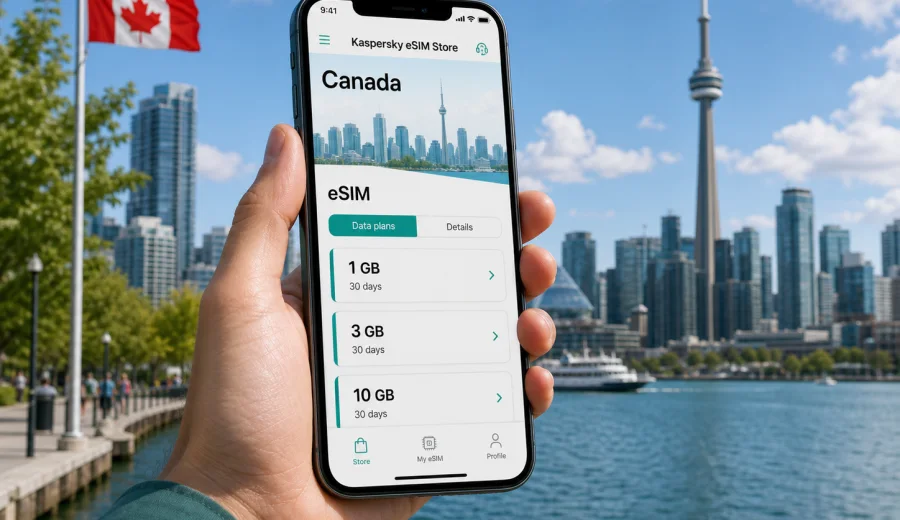
Canada eSIM: mobile connection and internet for your trip
If you are planning a trip across Canada, a Canada eSIM can make mobile connection and internet access easier from the first day. Instead of looking for a physical SIM card after landing, you can prepare a digital SIM profile before departure, choose a data package for your route, and use mobile internet on a compatible phone when local network conditions allow.
Canada is a large country, and travel patterns vary sharply. One visitor may spend a weekend in Toronto or Vancouver, while another may cross several provinces by train, car, or domestic flights. The right eSIM setup depends on your route, trip length, data habits, and device. This guide explains how to plan mobile internet for Canada, what to check before choosing an eSIM plan, and how Kaspersky eSIM Store can help you select, arrange, and activate an eSIM for a foreign trip.
Why an eSIM is useful in Canada
An eSIM is a digital SIM profile built into many modern smartphones and tablets. For travel, it is most useful when you need mobile data without changing your physical SIM card. You can keep your regular number active for calls or messages, while using the eSIM profile for internet access.
For Canada, this is practical in several common situations:
- you need maps, ride-hailing, hotel details, and messages after arrival;
- you want to reduce dependence on airport Wi-Fi, cafe Wi-Fi, or hotel networks;
- you are visiting several cities and want one data setup for the trip;
- you need a clear prepaid data allowance and validity period;
- you prefer to prepare your mobile internet before departure.
An eSIM for travel is mainly about mobile data. It usually does not include a standard phone number, voice calls, or SMS unless those features are clearly stated in the selected plan conditions. For calls and messages, many travelers use internet-based apps once mobile data is active.
Canada travel scenarios where mobile data matters
Canada is not only one destination. It is a set of very different travel scenarios, and each one changes how you use mobile internet.
| Travel scenario | Typical data needs | What to consider |
|---|---|---|
| City break in Toronto, Montreal, Calgary, or Vancouver | Maps, tickets, restaurant searches, messaging | A moderate package may be enough if hotel Wi-Fi is reliable |
| Business trip | Email, calendar, video calls, document access | Choose more data and keep a backup plan for busy days |
| Road trip through provinces | Navigation, weather, bookings, messaging | Coverage can vary outside cities and along remote routes |
| Ski or nature trip | Maps, weather, emergency contacts, photos | Download offline maps before visiting mountain or rural areas |
| Long family visit | Social media, video calls, banking, shopping apps | Pick a validity period that covers the whole stay |
The most important point is to match the plan to real use. Navigation, messaging, and booking apps are usually light. Video calls, cloud backups, streaming, and hotspot use can consume data quickly.
How much data to choose for Canada
There is no universal data amount for every traveler, but you can estimate your needs from your habits. Before selecting an eSIM plan, think about the number of days, how often you will be away from trusted Wi-Fi, and whether you plan to use your phone as a hotspot.
Here is a practical planning guide:
| Usage style | Examples | Suggested approach |
|---|---|---|
| Light | Maps, messengers, email, boarding passes | Choose a smaller data package and download offline maps |
| Standard | Daily maps, browsing, social media, ride apps | Choose a medium package for the full trip length |
| Heavy | Video calls, work files, frequent social uploads | Choose a larger package and monitor usage often |
| Shared device or hotspot | Laptop tethering, family sharing | Check whether hotspot use is allowed by the selected plan |
Avoid choosing only by price. A plan that is too small can run out at an inconvenient time, while a plan that is too large may waste unused data. The better question is: how many days will you need mobile internet without depending on Wi-Fi?
Before you choose an eSIM plan
Check these points before arranging an eSIM for Canada:
- your phone or tablet supports eSIM;
- your device is not locked to another mobile carrier;
- the selected plan covers Canada and matches your travel dates;
- the data allowance is enough for your expected use;
- you understand when the validity period starts;
- you know whether data roaming must be enabled for the eSIM profile;
- you have internet access available when installing the eSIM.
Device compatibility is the step travelers most often forget. Before you pay for a plan, check your device and confirm that eSIM is available on your exact model and region version. Some phones with similar names can have different eSIM support depending on where they were purchased.
How Kaspersky eSIM Store fits into the trip
Kaspersky eSIM Store is an app and website where you can quickly choose, arrange, and activate an eSIM with a suitable mobile data plan for an international trip. It helps you prepare mobile internet for your destination by showing plan details such as destination, data amount, validity period, and price before you commit.
The product is not a mobile network operator and does not own local networks in Canada. The practical value is in the travel workflow: you choose the destination, review available options, install the eSIM on a compatible device, and manage the plan through the site or app.
That workflow is useful because it keeps the preparation in one place. Instead of comparing roaming messages, looking for a store after arrival, or switching physical SIM cards, you can handle the eSIM setup in advance and focus on the trip.
Step-by-step: preparing mobile internet for Canada
Use this checklist before departure:
1. Confirm that your device supports eSIM and is carrier-unlocked.
2. Estimate your data needs for the full stay.
3. Choose Canada as the destination and compare available data options.
4. Review validity period, data amount, price, and activation notes.
5. Arrange the selected plan while you still have a stable connection.
6. Install the eSIM profile using the instructions provided.
7. Keep your primary SIM for calls or SMS if you need your usual number.
8. After arrival, select the eSIM profile for mobile data and follow the device prompts.
If you want to choose a plan before your trip, open the Canada page in Kaspersky eSIM Store and review the available options: choose an eSIM plan for Canada. This link is useful before the trip and again later if you need to check the destination page while planning.
Installation and activation basics
After checkout, the eSIM profile is usually available in your account, in the app, or through the instructions you receive. Installation can be done by following the screen steps or scanning a QR code, depending on the device and flow.
For Android devices, follow the Android installation guide. For iPhone, use the iOS installation guide. The exact names of menus can differ by phone model and operating system version, so follow the current prompts on your device.
A good installation habit is to add the eSIM while you still have reliable internet, such as at home, in the hotel, or at the airport before leaving Wi-Fi. Then, when you arrive in Canada, you can select the eSIM profile for mobile data and check whether data roaming must be enabled for that profile.
What to expect after arrival
When you land in Canada, your phone may need a few minutes to register the eSIM profile on an available local network. This depends on the device, local signal, network conditions, and plan settings. If mobile data does not start immediately, do not repeatedly delete and reinstall the profile. First, check the basic settings.
Quick troubleshooting checklist:
- confirm that the eSIM line is turned on;
- select the eSIM profile for mobile data;
- enable data roaming for the eSIM profile if the instructions require it;
- restart the phone if registration takes longer than expected;
- move to an area with stronger signal;
- check that the plan validity has started and data remains available;
- contact support if the issue continues.
Deleting an installed eSIM can create problems if the profile cannot be reused. Treat the eSIM profile like a travel document: keep it in place unless the instructions or support team tell you to remove it.
Canada-specific planning tips
Canada has excellent digital services in cities, but distance matters. Large urban areas usually make mobile data feel effortless for maps, messaging, tickets, restaurant reservations, banking apps, and ride services. Rural areas, mountain routes, national parks, ferries, and long highways can be less predictable.
Plan for these differences:
- download offline maps for national parks, mountain regions, islands, and long drives;
- save hotel addresses, reservation numbers, and insurance contacts offline;
- check whether your accommodation has reliable Wi-Fi before choosing a small package;
- avoid large cloud backups over mobile data unless you have enough allowance;
- keep a power bank ready if you use maps for long walking or driving days;
- monitor data use after video calls or tethering sessions.
For a city-focused trip, the main benefit of eSIM is convenience. For a cross-country or nature-focused trip, the benefit is preparation: you know what data package you selected, you have offline backups, and you are not relying on finding a SIM card counter at the right time.
eSIM compared with roaming and physical SIM cards
Travelers usually compare three options: international roaming from their home operator, a physical local SIM card, and a travel eSIM.
| Option | Strengths | Trade-offs |
|---|---|---|
| Home roaming | Keeps your usual SIM active; no new setup in some cases | Price and data limits can be unclear or high depending on your operator |
| Physical SIM | Familiar format; may include local number in some cases | Requires a store or delivery; you may need to remove your usual SIM |
| Travel eSIM | Digital setup; no physical card; useful before arrival | Requires compatible unlocked device and careful installation |
An eSIM can be a strong choice when you mainly need mobile internet, want to prepare in advance, and have a compatible phone. Roaming may still be convenient for short trips if your home operator offers a suitable package. A physical SIM may be useful for travelers who need a local number, but it adds an in-person step.
How to keep data use under control
A prepaid data package is easier to manage when you understand what consumes data. Canada trips often include navigation, photo sharing, booking apps, and weather checks. These are manageable if you watch heavier uses.
Practical controls:
- turn off automatic cloud photo and video uploads on mobile data;
- download playlists, maps, and entertainment before departure;
- use low-data mode in video and social apps;
- update apps only on trusted Wi-Fi;
- check data usage in phone settings every few days;
- use hotspot only when necessary;
- close navigation after you finish a route.
A useful rule: keep mobile data for movement and decisions, and use Wi-Fi for heavy downloads. That means maps, tickets, banking confirmations, translation, weather, and messages stay available on the move, while streaming and backups wait until you are on a trusted connection.
Regional and multi-country routes
Some travelers combine Canada with the United States, or use Canada as part of a wider North America itinerary. In that case, check whether you need a Canada-only plan, a separate plan for another country, or a regional option. Do not assume that a plan for one country automatically works in another.
For example, a trip from Vancouver to Seattle, Toronto to New York, or Montreal to Boston may cross borders even if it feels like one travel route. Review the destination coverage before choosing. If your route includes several countries, compare country-specific and regional options in the store and choose the one that matches the actual itinerary.
Common mistakes to avoid
The most common eSIM mistakes are easy to prevent:
- choosing a plan before checking device compatibility;
- installing the eSIM only after leaving all Wi-Fi access;
- assuming that an eSIM includes a local phone number;
- forgetting to select the eSIM for mobile data;
- turning off roaming data when the eSIM instructions require it;
- using video streaming on a small data package;
- deleting the eSIM profile during troubleshooting;
- choosing a validity period shorter than the trip.
If you avoid these, the setup is usually straightforward. The aim is not to make your phone complicated. The aim is to separate roles clearly: your usual SIM can remain available for your regular number, while the travel eSIM handles mobile data in Canada.
Quick checklist for Canada
Before you travel:
- check eSIM support and carrier lock status;
- choose a data amount based on trip length and habits;
- install the eSIM while you have stable internet;
- save installation instructions offline;
- download maps for remote or nature-heavy routes;
- decide which SIM handles mobile data;
- keep your account access details available.
After you arrive:
- turn on the eSIM line;
- select it for mobile data;
- follow any roaming setting instructions for that profile;
- test maps and messaging before leaving the airport or hotel;
- monitor data use during the first day.
This checklist is especially useful for first-time eSIM users. Once you understand the sequence, future trips become easier because the preparation steps are similar from country to country.
FAQ
Does an eSIM for Canada include calls and SMS?
Usually, travel eSIM plans are focused on mobile data. A standard phone number, voice calls, and SMS are not included unless the selected plan clearly says so. You can use messaging and calling apps over mobile internet.
Can I install the eSIM before I arrive in Canada?
In many cases, yes. Installing the profile before departure can be convenient, but read the plan conditions carefully so you understand when validity starts. Activation and data use can depend on the selected plan and local network registration.
Do I need to remove my physical SIM card?
Usually no. Many compatible phones let you keep your physical SIM and add an eSIM profile. You can then choose which line handles mobile data. This is useful if you want to keep your regular number available.
Will an eSIM work in remote parts of Canada?
Mobile coverage depends on local networks, geography, device settings, and the selected plan. Canada has remote areas where signal can be limited. Download offline maps and essential trip details before long drives, parks, islands, or mountain routes.
Can I use hotspot with a Canada eSIM?
Hotspot availability depends on the selected plan and device settings. Check the plan details before relying on tethering for a laptop or another traveler.
What should I do if mobile data does not start?
Check that the eSIM line is on, it is selected for mobile data, and the correct roaming setting is enabled if required. Restart the phone and move to an area with better signal. If the issue continues, contact support and keep the eSIM profile installed.
Choose an eSIM plan for Canada
Kaspersky eSIM Store helps you prepare mobile internet for a Canada trip through a simple site and app workflow: choose the destination, compare available data options, arrange the selected plan, install the eSIM on a compatible device, and activate it according to the instructions.
If Canada is your destination, review the available eSIM options before you travel and choose a data package that fits your route, trip length, and expected usage: choose an eSIM plan for Canada.