
Гид по связи в поездках
Iceland eSIM for mobile internet
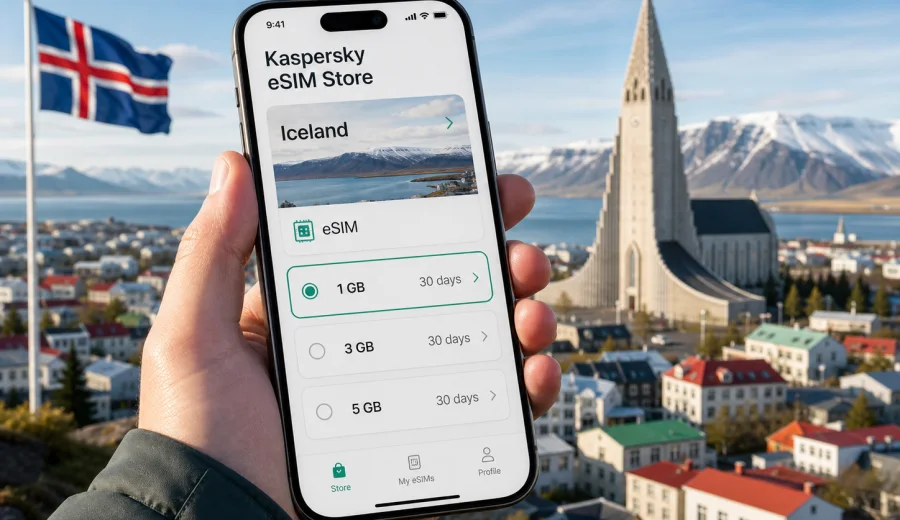
Iceland eSIM: mobile connection and internet for your trip
Iceland is a country where mobile internet can make the difference between a smooth trip and a day of small complications. You may need maps on the road from Keflavik Airport to Reykjavik, weather updates before driving the Ring Road, booking details for a guesthouse in the south, or a messenger call after a late arrival. An eSIM helps you prepare mobile connection and internet for Iceland without looking for a physical SIM card after landing.
If you are planning a trip, Iceland eSIM options in Kaspersky eSIM Store can help you choose a suitable data plan, check the traffic allowance and validity period, then install the eSIM on a compatible device. Kaspersky eSIM Store is an app and website for choosing, arranging, installing, and activating an eSIM plan for mobile internet in international travel. It is not a mobile operator and does not own the local network, so the actual connection experience depends on the selected plan, your device, local network conditions, and the route.
Why eSIM is useful in Iceland
Iceland is easy to travel independently, but many practical steps depend on being online. Distances are long, weather changes quickly, and some places outside Reykjavik have limited opening hours. A prepared eSIM can reduce the number of things you need to solve at the airport or in a city shop.
Typical online tasks in Iceland include:
- opening navigation for Reykjavik, the Golden Circle, the South Coast, Akureyri, Myvatn, or the Ring Road;
- checking road and weather updates before driving through exposed areas;
- finding petrol stations, grocery stores, parking zones, and charging points;
- managing hotel, rental car, tour, and ferry bookings;
- using translation, banking, ride, and airline apps;
- staying in touch through messengers when your regular SIM is kept for calls or banking SMS.
An eSIM is especially practical if your phone supports dual SIM. You can keep your usual physical SIM active for important messages, then use the eSIM profile for mobile data in Iceland. Before you travel, check your phone settings and plan conditions so you know which SIM handles data, calls, and roaming.
eSIM, roaming, public Wi-Fi, or local SIM: what to choose
There is no single best option for every traveler. The right setup depends on how long you stay, how much data you use, whether you drive outside cities, and how your home operator charges for roaming.
| Option | When it can work well | What to check |
|---|---|---|
| eSIM for Iceland | You want mobile data ready before or soon after arrival and do not want a physical SIM card | Device compatibility, plan validity, traffic allowance, activation rules |
| Home roaming | You need your regular number and your operator has a clear roaming package | Daily charges, fair use limits, speed limits, included countries |
| Public Wi-Fi | You mostly stay in hotels, cafes, and visitor centers | Availability, security, login portals, gaps between locations |
| Local physical SIM | You are staying longer and are comfortable visiting a shop | Opening hours, registration rules, SIM size, language and plan terms |
For many short and medium trips, eSIM is a practical middle ground. You can review the plan before travel, avoid changing a physical SIM card, and keep data usage separate from your regular mobile plan. It does not replace every feature of a local mobile subscription: many travel eSIM plans are data-only and may not include a phone number, voice calls, or SMS unless this is stated in the plan terms.
How much mobile data you may need in Iceland
Your data use depends more on behavior than on the country. Still, Iceland has travel patterns that influence usage: long drives, frequent map checks, photo uploads, and weather monitoring. If you travel by car, assume you will use navigation often. If you plan to work remotely, stream video, or share photos every evening, choose a larger package.
Approximate planning guide:
| Trip style | Typical online behavior | Practical data range |
|---|---|---|
| Weekend in Reykjavik | Maps, messages, tickets, light browsing | 1-3 GB |
| 5-7 days with day trips | Navigation, weather, bookings, social apps | 3-10 GB |
| Ring Road itinerary | Daily maps, route checks, cloud backups, messengers | 10 GB or more |
| Remote work or heavy media use | Video calls, file uploads, streaming, hotspot | Larger plan or top-up option |
These ranges are not guarantees. Streaming, automatic photo backup, app updates, and hotspot use can consume data quickly. Before leaving, download offline maps, music, airline documents, hotel confirmations, and rental car details over home Wi-Fi. This keeps your eSIM plan for tasks that truly need mobile internet on the road.
Choosing an eSIM plan for Iceland
When comparing eSIM plans, do not look only at the headline amount of data. A plan should match your dates, route, and device. In Kaspersky eSIM Store, review the country or region, data volume, validity period, price, and activation details before you proceed.
Use this checklist:
- Destination: make sure the plan covers Iceland, or choose a regional Europe plan if your trip includes several countries.
- Data amount: estimate navigation, messaging, browsing, and media use.
- Validity: choose a period that covers the whole stay, including arrival and departure days.
- Activation rules: check when the plan starts and whether you need to activate it after arrival.
- Device support: confirm that your phone or tablet supports eSIM and is not locked to another carrier.
- Hotspot: if you plan to share data with a laptop or travel partner, check whether tethering is allowed in the plan terms.
- Top-up: if available for the selected plan, note how you can add more data later.
For a short Reykjavik stay, a smaller data plan may be enough if you rely on hotel Wi-Fi for large downloads. For a winter road trip, a larger plan can be more comfortable because you may check weather, road conditions, maps, and messages several times a day. For a multi-country itinerary, such as Iceland plus Denmark, Norway, Sweden, or the United Kingdom, compare a single-country plan with a Europe plan. The better choice depends on route and the plan terms available for your dates.
Iceland travel scenarios where mobile internet matters
Arrival at Keflavik Airport
Keflavik Airport is about 50 kilometers from Reykjavik. After landing, you may need transport tickets, shuttle details, rental car instructions, hotel messages, or navigation. Having an eSIM prepared before the trip can make the first hour easier, especially if you arrive late or travel with luggage.
Reykjavik and short city stays
In Reykjavik, mobile internet is useful for walking routes, restaurant reservations, parking apps, museum tickets, and checking bus times. If your itinerary is mostly urban, your data needs may be moderate, but staying online still saves time.
Golden Circle and South Coast
The Golden Circle, waterfalls, black sand beaches, and glacier areas are popular self-drive routes. You may move between attractions, parking areas, and accommodation with limited time. Mobile data helps with route changes, weather checks, and quick communication with tour operators or hosts.
Ring Road and remote regions
A longer trip around Iceland makes planning more important. Download offline maps before departure, but keep mobile data for live information, bookings, and changes. Coverage conditions can vary by location and terrain, so do not treat any mobile plan as a substitute for sensible route planning. Keep your accommodation address, emergency numbers, and key documents available offline as well.
Work and study travel
If you need video calls or file access, choose a larger plan and test your setup before important meetings. Hotel Wi-Fi may be enough in some places, but a mobile data plan gives you an extra option for email, messaging, and urgent tasks. Avoid large system updates on mobile data unless you have enough allowance.
Prepare your phone before you travel
The best time to solve eSIM setup questions is before departure, while you still have stable Wi-Fi and access to your regular support channels. A few checks can prevent most problems.
Before buying or activating an eSIM plan, check:
- your device supports eSIM;
- your device is not locked to one mobile operator;
- your operating system is updated enough for eSIM installation;
- you know where to find the SIM or Cellular settings on your phone;
- you have access to the email or account where installation details will arrive;
- your phone has enough battery before arrival;
- you understand whether the selected plan starts immediately or after connection in the destination.
You can use the compatibility check before choosing a plan: Check your device. Compatibility matters because eSIM support differs by model, country version, and carrier lock status. Two phones with similar names may have different eSIM capabilities.
How to install and activate an eSIM for Iceland
The exact screens differ between iOS and Android, but the general sequence is similar. In Kaspersky eSIM Store, choose the destination and suitable plan, complete the arrangement process, then follow the installation instructions shown for your device. You can also use the Android installation guide or the iOS installation guide if you want a step-by-step reference.
Typical setup flow:
1. Check that your smartphone supports eSIM and is unlocked.
2. Choose Iceland or the relevant region in Kaspersky eSIM Store.
3. Select a data plan by traffic amount and validity period.
4. Install the eSIM profile using the on-screen instructions or QR code.
5. Name the profile clearly, for example "Iceland data".
6. When you are ready to use it, select the eSIM profile for mobile data.
7. If the plan instructions require it, enable data roaming for that eSIM profile.
8. Keep your primary SIM settings under control so calls, messages, and mobile data use the correct line.
Do not delete the eSIM profile after installation unless you are sure you no longer need it. Some eSIM profiles cannot be reinstalled or moved to another device after activation, depending on the plan conditions. If something does not work, check the plan instructions and phone settings before removing the profile.
Choose an eSIM plan for Iceland
Practical settings for iPhone and Android
On iPhone, the relevant settings are usually under Cellular or Mobile Data. You can label each line, choose the default voice line, and select which line is used for mobile data. If you keep your regular SIM active, make sure data roaming is not accidentally enabled on the wrong line if that would create extra charges from your home operator.
On Android, the names of settings vary by brand. Look for Network and Internet, Connections, SIM manager, or Mobile network. After adding the eSIM, choose it for mobile data. Some plans require data roaming to be enabled on the travel eSIM profile, even though you are using it in the destination. This is a technical setting for the selected profile and does not mean you should enable roaming on your home SIM.
What to know about coverage in Iceland
Iceland has good mobile service in many populated and traveled areas, but the country also has mountains, lava fields, fjords, and long remote roads. Mobile coverage and speed can vary. An eSIM plan gives your compatible device access according to the selected plan and local network conditions, but no travel mobile setup should be treated as a guarantee of connection in every valley, tunnel, or highland route.
If you plan to drive outside main towns:
- download offline maps for the whole route;
- keep your accommodation details available offline;
- check weather and road information before leaving Wi-Fi;
- charge your phone and carry a power bank;
- avoid relying on mobile internet as your only navigation or safety tool in remote areas.
This is especially important in winter, during storms, and on routes where services are far apart.
A simple data-saving plan for Iceland
You can make a smaller plan last longer with a few settings:
- Before departure: download maps, playlists, boarding passes, travel documents, and translation language packs.
- On arrival: use mobile data for transport, maps, and messages first, not large media uploads.
- During the day: keep navigation active only when needed and avoid automatic cloud backup.
- In the evening: upload photos and videos on trusted Wi-Fi if available.
- Before a long drive: refresh route, weather, and booking information while you still have a stable connection.
For families or groups, avoid putting everyone on one phone hotspot unless the plan is large enough and tethering is allowed. A shared hotspot can drain the phone battery and use data quickly. In some cases, separate eSIM plans for separate devices are easier to manage.
Common mistakes to avoid
Many eSIM problems come from setup details rather than the eSIM technology itself. Before contacting support, check the basics.
Avoid these mistakes:
- buying a plan before confirming eSIM compatibility;
- installing the profile on the wrong device;
- deleting the eSIM profile after installation;
- selecting your home SIM for mobile data by accident;
- assuming a data-only plan includes voice calls or SMS;
- starting a limited-validity plan too early;
- using hotspot, video streaming, or cloud backup without checking data allowance;
- relying only on mobile internet for remote route planning.
If you need ordinary phone calls, check your home operator options or use internet-based calling apps when your data connection is active. If you need SMS for banking or login codes, keep your primary SIM available and check possible roaming charges with your home operator before travel.
Quick comparison by traveler type
| Traveler type | Recommended approach |
|---|---|
| First-time visitor | Install eSIM before departure, keep offline maps, choose a plan that covers all trip days |
| Self-drive traveler | Prioritize enough data for navigation and weather checks, carry a charger, save key information offline |
| Business traveler | Choose a larger allowance, test hotspot rules if needed, keep video calls on Wi-Fi where possible |
| Family traveler | Estimate data per device, avoid uncontrolled hotspot sharing, download entertainment before travel |
| Stopover traveler | A small plan may be enough for maps, transport, messaging, and basic browsing |
FAQ about eSIM and mobile internet in Iceland
Can I use eSIM in Iceland without a physical SIM card?
Yes, if your device supports eSIM and the selected plan covers Iceland. You install a digital SIM profile instead of inserting a physical SIM card. Before choosing a plan, check compatibility and make sure the phone is not locked to another carrier.
Does a travel eSIM include a phone number?
Many travel eSIM plans are data-only. They may not include a local phone number, voice calls, or SMS unless the plan terms say so. For calls and messages, you can often use internet-based apps while mobile data is active.
Should I install the eSIM before flying to Iceland?
Installing the profile before departure can be convenient because you have stable Wi-Fi and time to check settings. Activation timing depends on the selected plan, so read the instructions carefully. Some plans start when installed, while others start when they connect in the destination.
Do I need data roaming turned on?
Some eSIM plans require data roaming to be enabled for the eSIM profile. Follow the plan instructions. Be careful to enable roaming only for the travel eSIM if you do not want your home SIM to use roaming data.
Can I use one eSIM for Iceland and other countries?
It depends on the plan. If you visit several countries, compare an Iceland-only plan with a regional Europe plan. Check included destinations, validity, data amount, and price before you decide.
What happens if I use all the data?
The result depends on the plan terms. You may be able to top up, choose another plan, or continue only through Wi-Fi. Check available options in your profile or the app before the allowance runs out.
Is eSIM enough for remote Iceland routes?
It is useful, but it should not be your only preparation. Coverage can vary in remote areas and difficult terrain. Download maps, save key documents offline, and check route conditions before leaving populated areas.
Final checklist before departure
Before you leave for Iceland, make sure you can answer these questions:
- Is my phone eSIM-compatible and unlocked?
- Have I chosen a plan that covers Iceland and all travel dates?
- Do I understand when the plan validity starts?
- Have I installed or saved the installation instructions?
- Do I know which SIM is selected for mobile data?
- Have I downloaded offline maps and travel documents?
- Have I disabled background updates that could use data too quickly?
- Do I know how to contact support if installation or activation questions appear?
Good mobile internet planning is not only about having data. It is about knowing when the plan starts, how your phone uses each SIM, and what you can do offline if coverage changes during the journey.
Choose an eSIM plan for Iceland
Kaspersky eSIM Store helps you prepare mobile internet for an international trip by choosing, arranging, installing, and activating an eSIM plan for your destination. For Iceland, compare the available traffic amounts and validity periods, check that your device supports eSIM, and keep the setup instructions ready before you travel.
Choose an eSIM plan for Iceland: