
Гид по связи в поездках
Iceland eSIM: mobile internet for travel
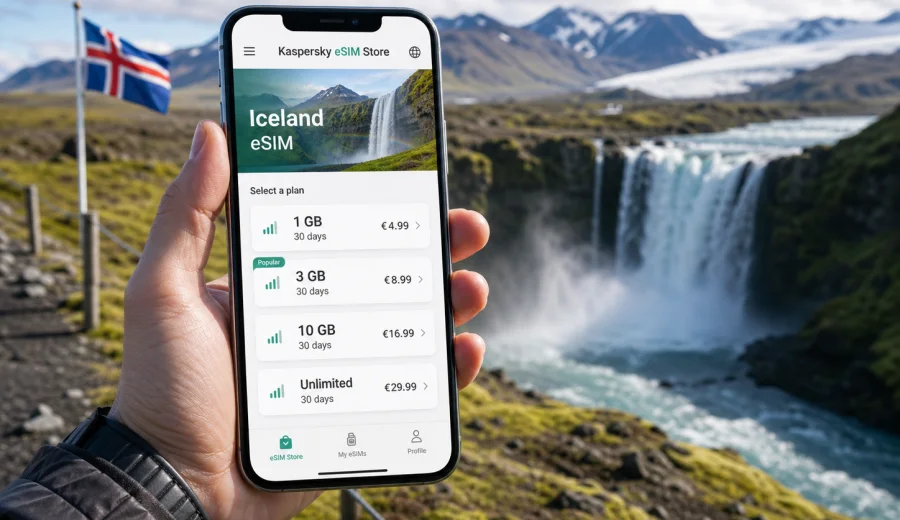
eSIM for Iceland: mobile connection and internet for your trip
If you are planning a trip to Iceland, an Iceland eSIM can help you prepare mobile internet before you leave or soon after you arrive. Instead of looking for a physical SIM card at the airport or relying on hotel Wi-Fi, you can choose an eSIM plan for your destination, install it on a compatible phone, and use mobile data for maps, bookings, transport apps, messages, and everyday travel tasks.
Iceland is a country where mobile internet matters in very practical ways. Many trips begin at Keflavik International Airport, continue to Reykjavik, and then move quickly toward the Golden Circle, the South Coast, the Snæfellsnes Peninsula, Akureyri, the Westfjords, or the Ring Road. Distances can feel longer than they look on a map, weather changes fast, and you may need online access for route updates, accommodation details, car rental messages, ferry information, and emergency contacts.
An eSIM is not a magic guarantee of signal in every remote valley, and it is not a replacement for sensible offline preparation. It is a convenient way to prepare mobile data for a foreign trip without inserting a plastic SIM card. In Kaspersky eSIM Store, you can choose Iceland as your destination, compare available data amounts and validity periods, complete the setup, and activate the eSIM on a compatible device.
Why mobile internet is useful in Iceland
Iceland is easy to explore independently, but many travel decisions happen on the move. You may need to check whether a road is open, confirm a tour departure, find the next fuel stop, upload documents for a booking, call a ride service, or message your host about arrival time. Public Wi-Fi can help in hotels and some cafes, but it is not something you should depend on during transfers, hikes, road trips, or late arrivals.
Mobile internet through an eSIM can be useful in these common situations:
- arriving at Keflavik and opening maps before picking up a rental car;
- navigating from the airport to Reykjavik without searching for Wi-Fi;
- checking accommodation details while travelling around the Ring Road;
- using messaging apps to coordinate tours, transfers, and dinner plans;
- paying for parking or transport where online confirmation is needed;
- checking weather and road conditions before driving to rural areas;
- sharing your location with travel companions;
- using translation, banking, and airline apps during the trip.
The main advantage is control. You can review the data allowance, validity period, destination, and price before choosing a plan. This is especially helpful if you know your route and can estimate whether you need a light data package for messaging and maps or a larger one for longer travel days.
eSIM, roaming, and local SIM cards: what changes for travellers
There are three common ways to get online in Iceland: international roaming from your home operator, a physical local SIM card, or an eSIM plan for travel. Each option can work, but they fit different habits.
| Option | What it is good for | What to check |
|---|---|---|
| Home roaming | Short trips when your current plan already includes fair roaming terms | Daily fees, data limits, speed rules, and roaming activation |
| Physical SIM | Longer stays when you want a local SIM card and do not mind visiting a shop | Opening hours, identification requirements, SIM size, and setup time |
| eSIM for travel | Preparing mobile data without changing a physical SIM card | Device compatibility, plan validity, data volume, and activation steps |
An eSIM is often the most convenient option when you want to land with a plan already prepared. You keep your physical SIM card in the phone, install the eSIM profile digitally, and select which line should handle mobile data. This can be useful if your main number must remain available for banking codes or incoming messages, while mobile data runs through the travel eSIM.
Before choosing any option, check how you actually use data. A traveller who mostly uses maps, chats, email, and booking apps may need much less data than someone who streams video, backs up photos, joins video calls, or uses a laptop through mobile hotspot.
How to choose an eSIM plan for Iceland
Start with three questions: how long will you stay, how much data do you usually use, and where will you travel inside the country? Iceland trips can be compact, such as a weekend in Reykjavik with the Blue Lagoon and Golden Circle, or they can be long and mobile, such as a Ring Road route with daily navigation and changing accommodation.
Use this simple planning table:
| Travel style | Typical online tasks | What to prioritise |
|---|---|---|
| City break in Reykjavik | Maps, restaurants, transport, messages, boarding passes | Short validity and moderate data |
| Golden Circle or South Coast trip | Navigation, weather checks, tour messages, photos sent in chats | Enough data for several active travel days |
| Ring Road journey | Daily route planning, accommodation apps, fuel stops, road updates | Longer validity and a larger data allowance |
| Remote work add-on | Email, cloud documents, calls, hotspot for a laptop | Larger data allowance and careful hotspot use |
| Family trip | Several devices, navigation, entertainment, messaging | Separate plans or a clear sharing strategy |
If your phone supports eSIM and is not locked to one carrier, you can prepare the plan before departure. In Kaspersky eSIM Store, choose Iceland, compare the available plan conditions, and select the amount of data and validity period that fit your trip. The exact options may differ by destination and time, so always review the plan screen before checkout.
Choose an eSIM plan for Iceland when you know your dates, route, and expected data use. This mid-trip planning step is best done before you are standing in an airport queue, trying to connect to a crowded Wi-Fi network.
How much data do you need in Iceland?
There is no single correct data amount for every traveller. The right plan depends on habits, group size, app settings, and whether you use Wi-Fi at hotels. Instead of choosing by guesswork, divide your usage into essential, convenient, and heavy tasks.
Essential tasks usually include:
- maps and route checks;
- booking confirmations;
- messaging apps;
- email;
- banking and airline apps;
- weather and road condition checks;
- translation and search.
Convenient tasks can include:
- posting photos to social media;
- light browsing;
- restaurant and attraction research;
- cloud notes and travel documents;
- app updates that cannot wait.
Heavy tasks are the ones that can drain a plan quickly:
- video streaming;
- large photo or video backups;
- long video calls;
- laptop hotspot use;
- downloading offline maps after arrival instead of before departure;
- automatic cloud sync over mobile data.
For Iceland, offline preparation is especially useful. Download offline maps, save hotel addresses, keep booking PDFs available without internet, and update travel apps before the trip. Then your eSIM data can be used for live information rather than routine downloads.
What to check before buying an eSIM
An eSIM works only on devices that support the technology and are allowed to use another mobile profile. Before choosing a plan, check your phone model, software version, and carrier lock status. Some phones support eSIM in one market but not another, and some operator-locked devices cannot add a travel eSIM until the lock is removed.
Check your device before you buy a plan. This is one of the most important steps because an eSIM profile is digital and may not be transferable to another phone after activation, depending on the plan and device conditions.
Use this checklist:
- Your smartphone or tablet supports eSIM.
- The device is not locked to a single carrier.
- You have a stable internet connection for installation.
- Your operating system is updated enough to manage eSIM profiles.
- You know which SIM line should handle mobile data.
- You understand when the plan validity begins.
- You have saved the installation instructions in case you need them later.
Also check whether the plan includes only mobile data. Travel eSIM plans usually do not include a regular phone number, voice calls, or SMS unless this is clearly stated in the plan conditions. For calls and messages, you can use internet-based apps through mobile data.
Installing and activating your eSIM
Installation is usually a short process, but it should not be rushed while boarding a flight or standing in a car rental queue. After choosing a plan, follow the instructions shown on the website or in the app. You may receive a QR code or installation details, and the eSIM profile will appear in your device settings after setup.
For detailed setup steps, use the official guides: Android installation guide and iOS installation guide. Keep the guide open on another device or save the key steps if you expect limited connectivity.
A practical setup sequence looks like this:
1. Check that your device supports eSIM and is not carrier locked.
2. Choose Iceland and select a plan by data amount and validity period.
3. Complete the order and open the installation instructions.
4. Install the eSIM profile while connected to stable Wi-Fi.
5. Name the eSIM clearly, for example “Iceland data”.
6. Keep your primary SIM for calls or messages if you need it.
7. Select the eSIM as the mobile data line when you are ready to use it.
8. Turn on data roaming for the eSIM if the instructions or device settings require it.
Activation timing matters. Some plans start validity after installation, some after first connection to a supported local network, and some have other rules. Always read the conditions of the selected plan before installing or activating it.
Practical Iceland travel scenarios
Different Iceland routes create different mobile internet needs. A city visitor may need short bursts of data, while a road trip traveller may need steady access throughout the day.
Arrival at Keflavik International Airport
The first online tasks are usually simple but important: opening maps, messaging your accommodation, checking the bus or car rental details, and confirming the route to Reykjavik. If the eSIM is installed before departure, you can switch the data line after arrival and avoid spending your first minutes looking for a SIM counter.
Reykjavik and nearby day trips
In Reykjavik, mobile data helps with restaurants, museums, parking apps, route planning, and meeting friends or tour groups. On day trips to the Golden Circle, Þingvellir, Geysir, Gullfoss, or the Blue Lagoon area, it is useful for live navigation and weather changes.
South Coast and glacier routes
The South Coast often involves many stops: waterfalls, black sand beaches, viewpoints, glacier lagoons, and small villages. Mobile data helps you adjust the plan when weather, daylight, or road conditions change. It also makes it easier to coordinate with guides or accommodation if arrival time changes.
Ring Road travel
A Ring Road trip is where planning becomes more important. You may move between regions every day, and Wi-Fi quality can vary by accommodation. Download offline maps and keep essential documents saved, then use mobile data for live updates and communication.
Remote areas and hiking days
No mobile solution should be treated as a safety guarantee in remote terrain. If you go into the Highlands, the Westfjords, or hiking areas away from towns, prepare offline navigation, share your plan, and follow local safety guidance. The eSIM is a mobile internet tool; it does not replace responsible travel preparation.
How to reduce data use during the trip
Good settings can make a smaller plan last longer. Before you arrive, review which apps are allowed to use mobile data and which should wait for Wi-Fi.
Recommended settings:
- download offline maps before departure;
- turn off automatic app updates over mobile data;
- pause cloud photo and video backup until Wi-Fi is available;
- disable autoplay video in social apps;
- set messaging apps to download media only on Wi-Fi;
- use compressed mode in browsers if available;
- monitor data use in your phone settings;
- use hotspot only when necessary.
If you travel with family or friends, avoid assuming one phone can comfortably support everyone all the time. Hotspot use can drain battery and data quickly. For a longer trip, separate eSIM plans on separate compatible devices may be easier to manage.
Common mistakes to avoid
Many eSIM problems are preventable. The most common issues happen when travellers skip compatibility checks, install too late, misunderstand plan validity, or leave mobile data assigned to the wrong SIM line.
Avoid these mistakes:
- buying a plan before checking whether the phone supports eSIM;
- waiting until the airport arrival hall to read the installation steps;
- deleting the eSIM profile without checking whether it can be reinstalled;
- assuming the plan includes calls and SMS;
- forgetting to switch mobile data from the home SIM to the eSIM;
- leaving expensive home roaming enabled by accident;
- using video streaming and hotspot without watching data balance;
- relying only on mobile signal for remote travel safety.
If something does not work immediately, check the basics first: the eSIM profile is installed, the correct line is selected for mobile data, data roaming for the eSIM is enabled if required, airplane mode is off, and you are in an area where a local mobile network is available. Restarting the device can also help it register on a network.
Quick preparation checklist
Use this checklist a few days before your flight:
| Step | Why it matters |
|---|---|
| Confirm phone compatibility | eSIM setup is possible only on supported devices |
| Check carrier lock status | Locked devices may reject a travel eSIM |
| Choose plan validity | The plan should cover your full stay or the active travel days |
| Estimate data use | Maps and messaging need less data than video and hotspot |
| Save instructions | You may need them when switching settings after arrival |
| Download offline essentials | Maps, tickets, hotel addresses, and booking PDFs reduce pressure on data |
| Decide SIM roles | Keep your main SIM for calls if needed and use eSIM for data |
| Review roaming settings | Avoid unintended home roaming charges |
This preparation takes only a short time, but it can make the first hours in Iceland much smoother. It is easier to solve setup questions at home with stable Wi-Fi than after a night flight, with luggage in one hand and a rental car booking on the phone.
FAQ about eSIM and internet in Iceland
Can I install an eSIM before travelling to Iceland?
Yes, in many cases you can install the eSIM before departure while you have stable Wi-Fi. Check the selected plan conditions carefully, especially when validity starts. Some travellers install the profile in advance and switch mobile data to the eSIM after landing.
Does an eSIM give me an Icelandic phone number?
Usually, travel eSIM plans are focused on mobile data. They do not include a regular phone number, voice calls, or SMS unless the selected plan clearly says so. You can use internet-based calling and messaging apps through mobile data.
Do I need to remove my physical SIM card?
No, not usually. One benefit of eSIM is that you can keep your physical SIM card in the phone. You can keep your usual number available while using the eSIM for mobile data, if your device supports this setup.
Will eSIM mobile data work in every part of Iceland?
No mobile option should be described that way. Availability and quality depend on local networks, terrain, weather, device settings, and the selected plan. In remote areas, prepare offline tools and do not rely on mobile data as your only safety resource.
Can I use hotspot with an eSIM?
Hotspot availability depends on the selected plan and device settings. If it is allowed, remember that laptops and shared devices can use data much faster than a phone. Monitor your balance and avoid automatic updates over hotspot.
What should I do if the eSIM does not connect?
Check that the eSIM is installed, selected for mobile data, and allowed to use data roaming if required. Confirm that airplane mode is off and restart the phone. If the problem continues, use the support option in Kaspersky eSIM Store and include your device model, destination, and a brief description of the issue.
Choose an eSIM plan for your Iceland trip
For a trip to Iceland, eSIM is a practical way to prepare mobile internet without buying a physical SIM card after arrival. It can help with maps, bookings, messages, route updates, weather checks, and everyday travel apps from Reykjavik to the South Coast, the Golden Circle, Akureyri, or a longer Ring Road route.
Before you choose a plan, check device compatibility, review the data amount and validity period, and read the activation conditions. Then install the eSIM on a compatible device and select it as your mobile data line when you are ready to use it.
Choose an eSIM plan for Iceland in Kaspersky eSIM Store and prepare mobile internet for your trip before you need it on the road.